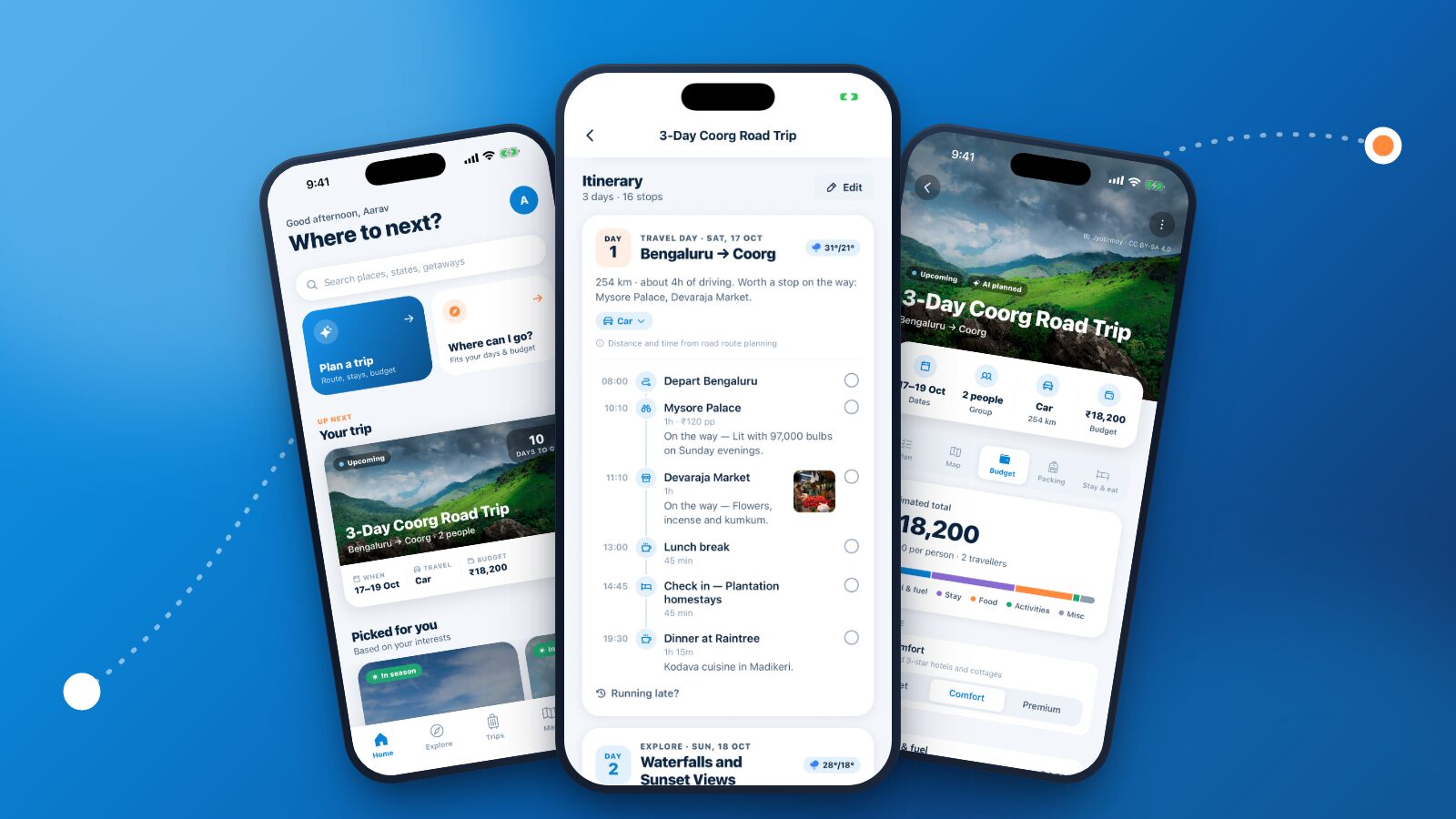
Try to plan a trip in India the usual way and you end up with fifteen browser tabs: one for the route, one for train timings, three for hotels, a blog for "things to do", a weather site, a spreadsheet for the budget and a notes app for the packing list. By the time it all fits together, half the excitement has gone.
JrnyLoop puts all of that in one place. You tell it where you're starting and where you want to go, and it gives you the whole trip: the route with sensible overnight halts, every day planned hour by hour, where to stay and what to eat, a budget for your group and a packing list made for where you're going. Then it keeps up when plans change on the road.
This guide shows you how to plan a trip in India with JrnyLoop, step by step, from signing in to setting off. It works the same on the website at jrnyloop.com and in the JrnyLoop app, and it's free to use. If you'd rather see everything JrnyLoop can do first, read JrnyLoop features: everything the AI trip planner does.
What you need before you start
Only two things: where you're starting from and where you want to go. Everything else (dates, who's coming, how you travel, your budget, your pace and what you enjoy) is optional, and JrnyLoop fills in sensible defaults for whatever you skip.
Don't have a destination yet? That's fine too. JrnyLoop's Where can I go? suggests places that fit your days and budget, and we'll come to it in step 2.
Have a rough budget in mind, even a loose one. It's the one input that changes the plan the most, because JrnyLoop picks the most comfortable stays your budget allows.
Step 1: Sign in and tell JrnyLoop how you travel
There are no passwords. Enter your email and JrnyLoop sends you a 6-digit code; the same code creates your account the first time. You can also continue with Google, and with Apple on an iPhone.
Next come three quick screens that personalise everything after them:
- Your name and how you travel. Pick the one that sounds most like you: Bike, Car, Backpacker, Couple, Family, Solo, Friends or With strangers (group tours).
- What you love. Choose from Nature, Mountains, Beaches, Food, Adventure, History, Photography, Spiritual, Nightlife and Shopping. JrnyLoop favours sights and places that match.
- Where you start from. Search for your home city, or in the app, set it from your location in one tap. This is where trips start by default, and it's how JrnyLoop knows which weekend getaways are close to you.
You can change all of this later from your profile, so don't overthink it.
Step 2: Start a trip, or let JrnyLoop suggest one
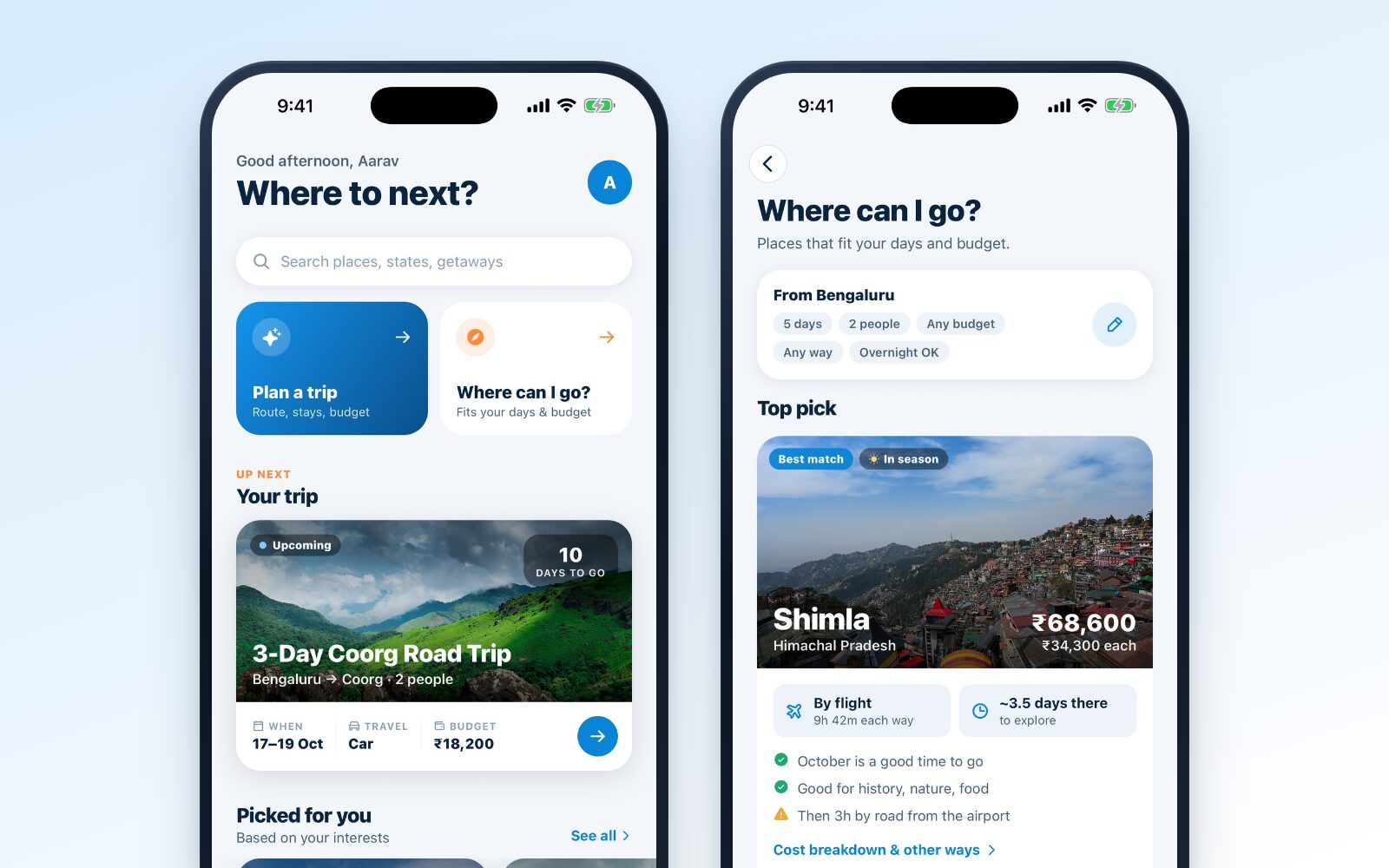
The home screen gives you two big ways in: Plan a trip when you know where you're going, and Where can I go? when you don't. Below them sit your next trip and ideas to browse: places picked for your interests, weekend getaways from your city, places in season right now, ready-made trips and what's trending.
If you don't know where to go yet
Tap Where can I go? and fill in a short brief:
- Starting from: your home city, or anywhere else.
- How long: from 1 to 14 days.
- When: optional. With dates, JrnyLoop checks whether each place is in season.
- Budget: optional, as a total for the whole group.
- Who's going and how you'd like to get there, including whether overnight travel is OK.
- Interests, if you want to narrow things down.
Tap Find places and you get a top pick and a list of other places that fit, which you can sort by best match, cheapest or most time there. Each place shows what it would cost (in total and per person), how you'd get there and how long the journey takes, how many days you'd actually have to explore, and plain reasons for and against: "October is a good time to go", "Good for history, nature, food", or a heads-up like "Then 3h by road from the airport".
When one looks right, one tap plans the trip there, with your brief already filled in.
If you'd like a ready-made trip
Open Explore to browse destination guides and ready-made trips. A guide shows a place's best time to visit, its sights (filterable, and you can save them into collections), where to stay, what to eat and local tips. A ready-made trip previews the days, the stays, the food, the journey and the cost by category. Tap Use this trip and it becomes yours to change.
Step 3: Fill in the five steps of the planner
Tap Plan a trip and you'll see five short steps: Where, When, Who, How and Style. Only the first is required.
Where
Set From and To. You can also add up to three stops on the way: say Mysuru between Bengaluru and Coorg, or Mandi on the way to Manali. The route goes through them in order. Swap flips the start and the destination, and if you haven't picked a destination yet, JrnyLoop shows places close to your start to tap on.
When
Choose the trip length (1 to 21 days) and, if you know it, the start date. Dates are worth adding: they switch on the daily weather forecast and let JrnyLoop check the season. The Include the journey home switch decides whether the plan ends at your destination or brings you back.
Who
Solo, couple, family or friends. For families and friends, set how many of you are going (up to 30). Group size changes more than the budget: a family trip, for example, gets shorter driving days than a solo one.
How
Pick how you're travelling: Car, Bike, Train, Bus, Flight or Mixed (train for the long haul, car near the destination). This shapes the whole route. Drive times are stretched for how Indian roads really drive, a bike gets shorter riding days, and trains and flights use their own speeds.
Riding with a group? JrnyLoop's sister app for riders, RydrLoop, shares everyone's live location on the ride so no one falls behind. JrnyLoop links to it when you pick Bike.
Style
Enter a total budget for the group (or tap a preset from ₹5,000 to ₹1,00,000). Leave it empty and you get a comfortable mid-range plan. Then pick a pace:
| Pace | What it means |
|---|---|
| Relaxed | 2–3 stops a day, more time at each |
| Balanced | 3–4 stops a day |
| Packed | See as much as possible |
Finally, check your interests for this trip. They start from your profile, but a beach weekend with family can be different from your usual.
Tap Plan my trip. In a few seconds, JrnyLoop works out the route, splits long stretches at named overnight halts, lays out each day, prices everything for your group and writes your packing list.
Step 4: Read your plan, tab by tab
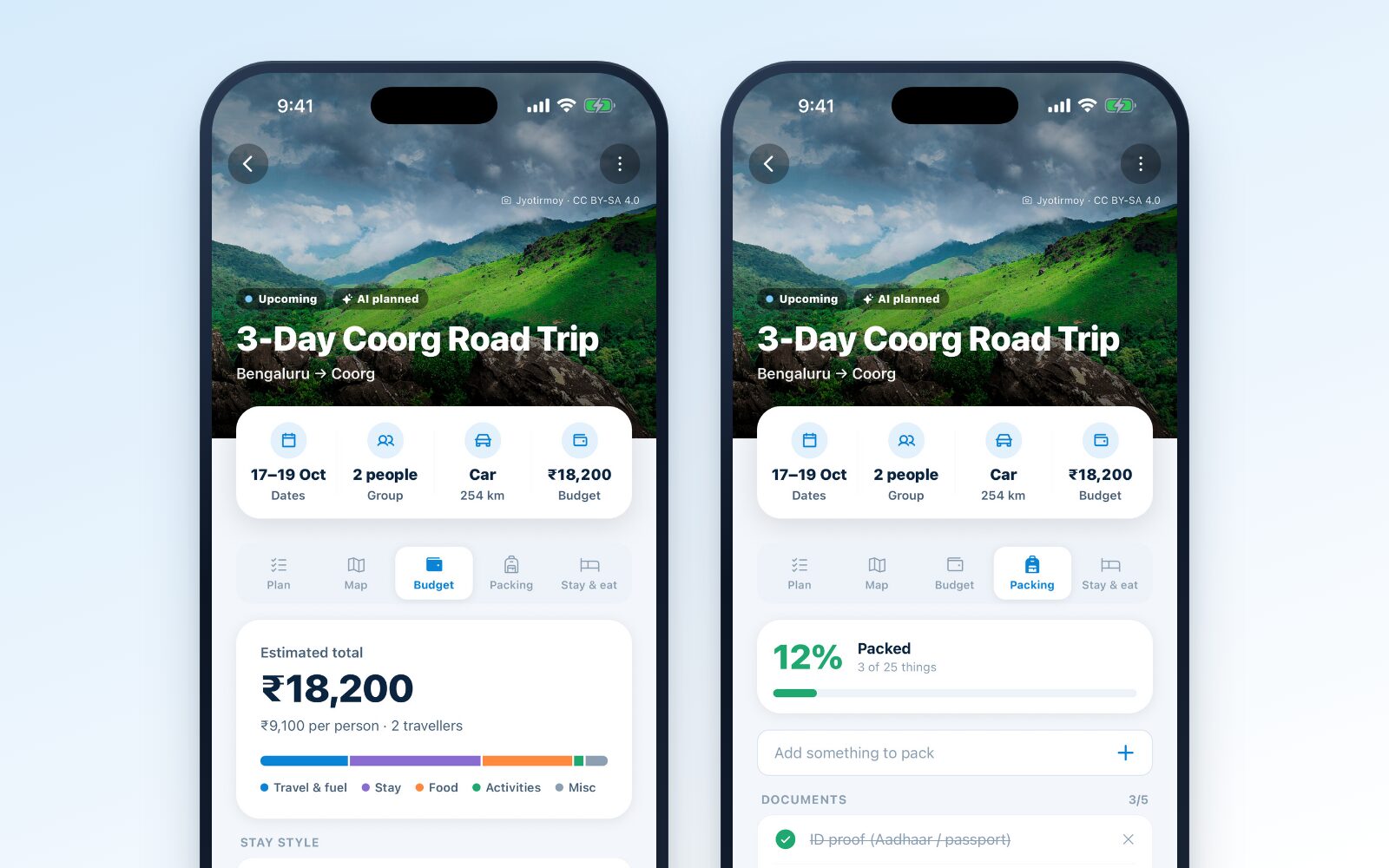
Your new trip opens with a photo of the destination and four facts at the top: dates, group, how you're travelling (with the distance and journey time) and the budget. If it's your trip, tap any of them to change it.
Below that are five tabs.
Plan
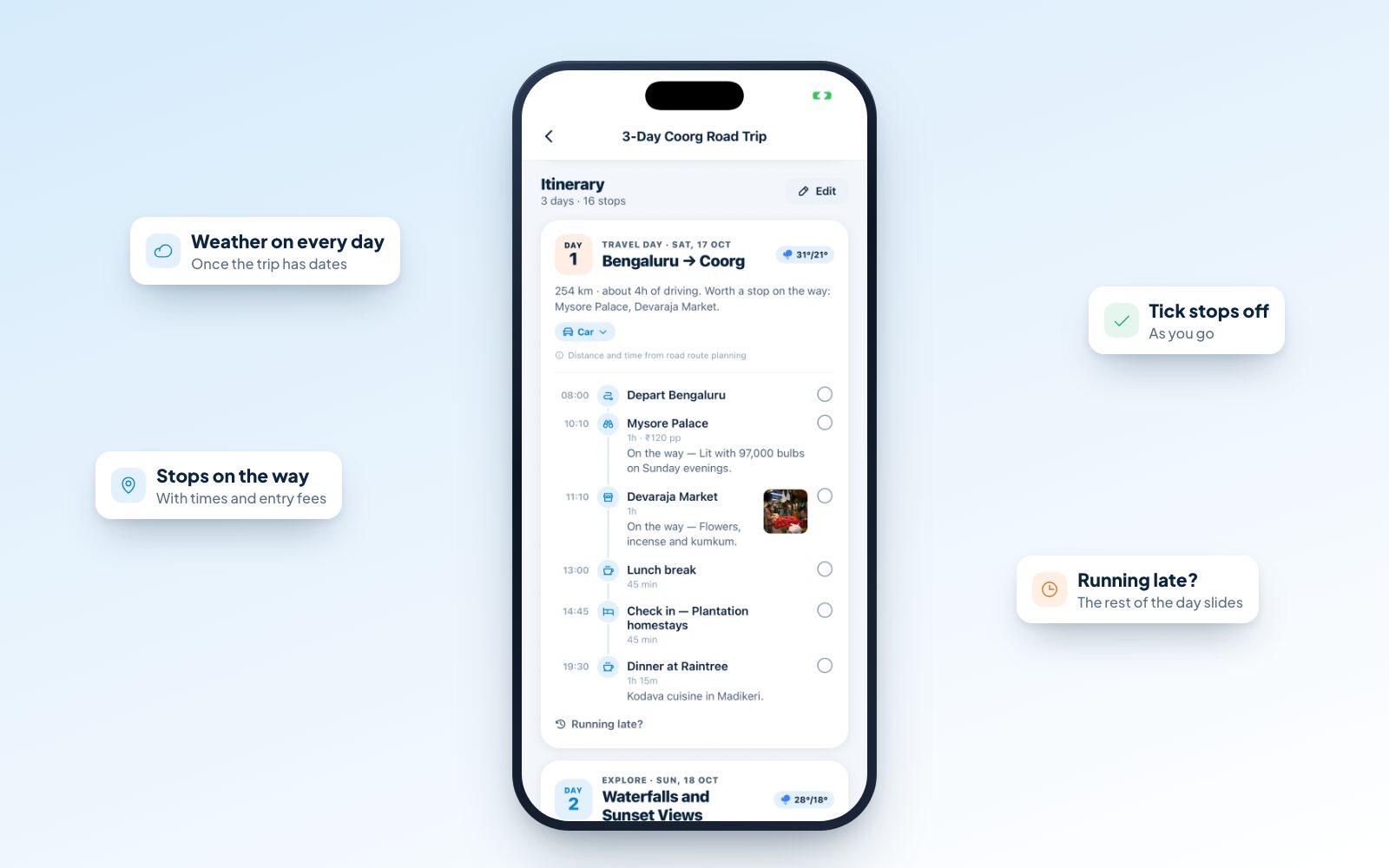
This is the itinerary, one card per day. Travel days show the distance and driving time, with breakfast, chai, fuel and lunch breaks, and sights worth stopping for on the way. Explore days group nearby sights and put them in the best order: sunrise points at sunrise, sunset points at sunset, with meals picked from what the place is known for.
Every stop has a time, how long it takes and what it costs to get in. Tap one to see where its details come from (JrnyLoop's own guide, Wikipedia, OpenStreetMap or AI) and how recently they were checked. AI suggestions are clearly marked, so you know what to double-check.
At the top of the Plan tab, Getting there compares the ways to reach your destination: bike, car, bus and train, each with its journey time. We'll come back to it in step 6.
Map
The route and every stop on a map, coloured by day. Filter to one day to see just what's ahead.
Budget
The estimated total for the trip, a figure per person, and a breakdown into travel and fuel, stay, food, activities and miscellaneous. Switch the stay style between Budget (hostels, homestays and simple hotels), Comfort (good 3-star hotels and cottages) and Premium (resorts and boutique stays), and the whole trip re-prices. Once you're travelling, this is also where you log what you actually spend.
Packing
A checklist written for the terrain, the season, how you're travelling and who's coming: a warm jacket and thermals for the mountains, your RC and PUC for a road trip, permit paperwork if the place needs it. Add your own items and tick things off as you pack.
Stay & eat
The trip's highlights, the best areas to stay and the food to try, each opening to real places nearby. You'll also find essentials near each night's stay (the nearest hospital or clinic, pharmacy and ATM, plus a fuel pump on road trips) and a space for your own notes.
An example: a Coorg weekend from Bengaluru
Here's what that looks like for a real plan: a 3-day road trip from Bengaluru to Coorg for two people, by car, in mid-October, with no budget entered.
Day 1 is a travel day: 254 km and about four hours of driving. Rather than a straight run, the day leaves Bengaluru at 8:00, stops at Mysore Palace around 10:10 (an hour, ₹120 a person) and Devaraja Market for its flowers, incense and kumkum, breaks for lunch at 1:00, checks in to a plantation homestay mid-afternoon and ends with dinner at a place known for Kodava food in Madikeri. The forecast sits at the top of the card: 31° by day, 21° at night.
Day 2 is an explore day built around waterfalls and sunset viewpoints, ordered so the viewpoint comes at the right time of day. Day 3 brings you home.
The budget comes to about ₹18,200 for the two of you, or ₹9,100 each, with Comfort stays. Switch to Budget stays and it drops; switch to Premium and it rises. The packing list has 25 things on it, from ID proof and booking confirmations to your driving licence, RC, insurance, PUC and FASTag balance.
None of it is fixed. If you'd rather skip the market and get to Coorg in time for a long lunch, remove the stop and the day closes up.
Step 5: Make the plan yours
A plan is a starting point. Here's how to shape it.
- Tap a stop to move it, make it longer or shorter, open it in Maps, or pin it as fixed. Pin anything you've booked, like a train, a dinner reservation or a paragliding slot, and every later change works around it.
- Edit the itinerary to remove stops or add your own (a name, a time and a cost if there is one).
- Change how you travel one leg. On a travel day, tap the travel mode to switch just that day, say from car to train, and it's re-timed and re-priced.
- Swap a rainy day. With dates set, every day shows its forecast. When rain is likely on a day full of outdoor plans, JrnyLoop suggests swapping it with a better day, and it's one tap.
- Change the dates or group size from the trip's menu, and the budget follows. Changing the trip itself (a new destination, a different way to travel) plans it again, while keeping your people, expenses and packing list.
- Rename the trip. "3-Day Coorg Road Trip" is a good default, but "Coorg with college friends" is better.
Step 6: Get ready to go
A few things are worth doing in the days before you leave.
Pick your train. If you're going by train, open Getting there and the Train tab lists the trains between the nearest stations, going and returning, from Indian Railways' Trains at a Glance. Tap one and choose Use train … for Day 1: the day takes the train's real times, and the rest of the day lines up after arrival. On popular routes the Bus tab shows where to board, who runs the buses and how often they leave, and the flight sheet tells you which airport makes sense and how far it is from where you're going. JrnyLoop doesn't sell tickets; you book with the operator as usual.
Keep your bookings with the trip. Bookings & tickets, a row on the Plan tab, holds your PNRs, flight codes, hotel bookings and photos of the tickets, sorted by date. In the app they stay on your phone once you've opened them, so they open at the station even with no signal.
Add it to your calendar. From the trip's menu, Add to calendar puts one event on each day of the trip, with the day's stops in the notes.
Pack with the list. Tick things off as they go in the bag.
Check permits. Some places in India need an entry permit for Indian visitors, such as an Inner Line Permit. When yours does, JrnyLoop tells you on the trip and adds the paperwork to your packing list.
Open the trip once before you go. In the app, trips you've opened stay on your phone, and JrnyLoop keeps your next few upcoming trips ready too. When the network drops on a mountain road, the plan still opens.
Bring your people in. Going with others? Tap Travelling with others? on the trip to send them an invite link. They see the plan and can split expenses with you. Our guide to planning a group trip with friends covers that in detail. To just show someone the plan, share a trip link instead: anyone can open it without an account, and you choose whether it shows your start and your dates.
While you're travelling
Once the trip starts, the app's home screen shows a Today card: the day's weather, the stop to head to next with directions, and the rest of the day at a glance.
Running behind on your own trip? Tap Running late? and choose +30 minutes, +1 hour or +2 hours. Everything not yet done slides later, pinned stops stay where they are, and JrnyLoop tells you if something no longer fits. Tick stops off as you go, and log expenses as they happen so the budget stays honest.
When you're home, mark the trip completed from its menu. JrnyLoop never does this on its own (maybe the dates moved, or the trip didn't happen), so your travel stats only count trips you actually took.
Tips for a better plan
- Add dates as early as you can. They turn on the forecast, the season check and the reminders.
- Be honest about pace. "Packed" sounds efficient until day three. Relaxed or Balanced suits most trips with family.
- Use stops on the way for long drives. A night in a town you'd otherwise drive through often becomes the best part of the trip.
- Pin your bookings straight away. Then "Running late?" and every other change respects them.
- Treat costs and timings as careful estimates. Prices, opening hours and train timings change, so confirm before you book or travel.
- Save sights while you browse. Saved places live in collections on your profile and show on the map, ready for the next trip.
Ready to plan a trip in India?
Planning a trip in India doesn't have to take a weekend of research. Tell JrnyLoop where you're starting and where you're going, check the plan, make it yours, and spend the time you saved looking forward to the trip.
Ready? Plan your trip on JrnyLoop. It's free, and you only need an email to sign in.


Comments