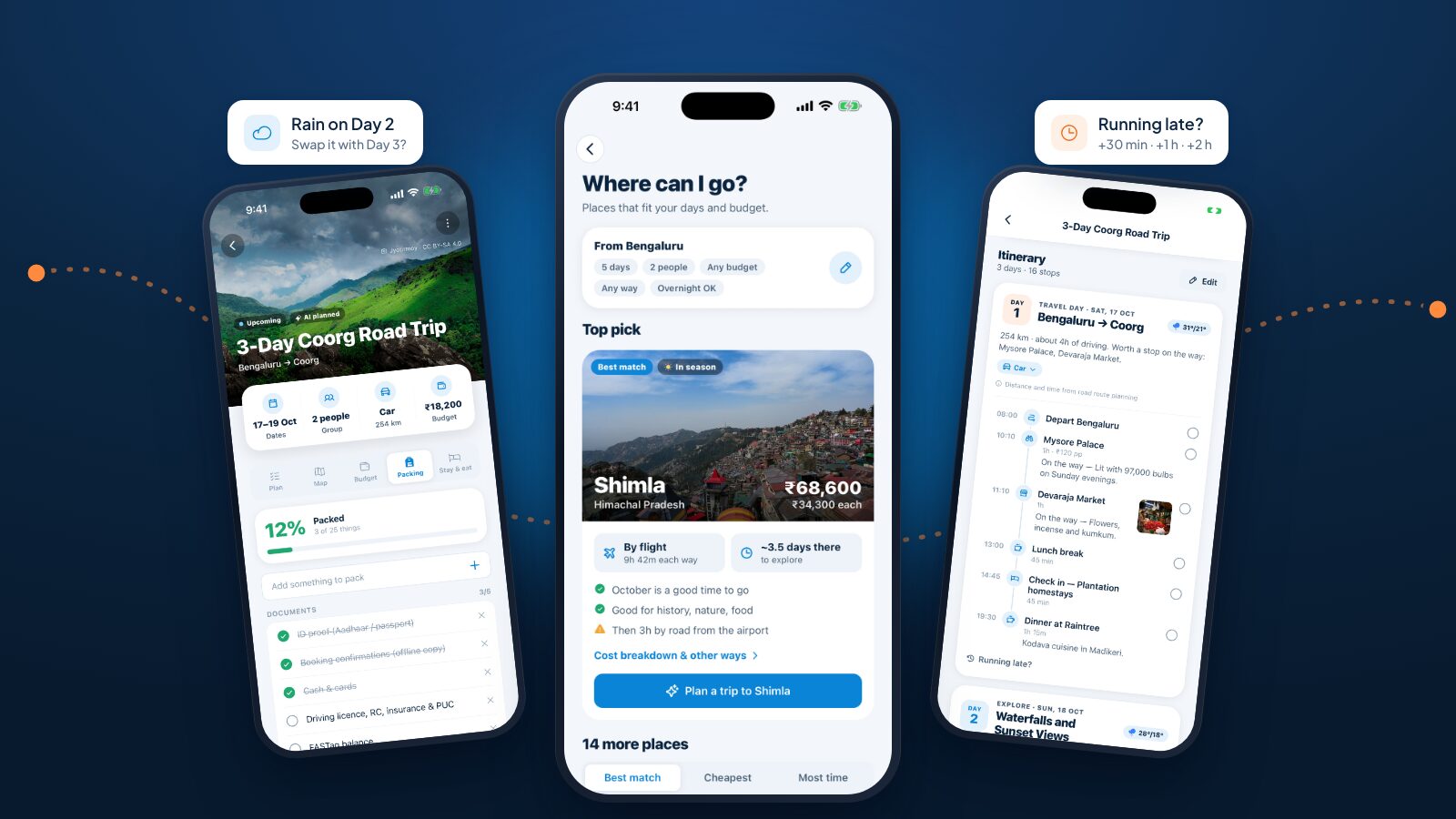
Most travel apps are good at one job. One finds hotels, another tracks trains, a third splits the bill, and you're left to stitch them into an actual trip. JrnyLoop is an AI trip planner built for travelling in India, and it works the other way round: it starts from the trip and plans all of it, then keeps planning while you're on the road.
This post walks through every JrnyLoop feature, grouped the way a trip goes: deciding where to go, planning it, getting ready, travelling, and travelling together. If you'd like a hands-on walkthrough instead, start with how to plan a trip in India with JrnyLoop.
JrnyLoop at a glance
| Stage | What JrnyLoop does |
|---|---|
| Deciding | Where can I go?, destination guides, ready-made trips, saved places |
| Planning | Route with overnight halts, day-by-day itinerary, budget, packing list, stays and food |
| Getting ready | Getting there (trains, buses, flights), bookings wallet, calendar, permits, reminders |
| On the road | Today card, Running late?, weather swaps, essentials near your stay, offline trips |
| Together | Invite links, polls, shared expenses, shared bookings, trip links anyone can open |
It's free, it covers anywhere in India, and the website and the app share one account, so a trip you start on a laptop is waiting on your phone.
Planning it yourself vs planning with JrnyLoop
| On your own | With JrnyLoop | |
|---|---|---|
| Route | Maps and guesswork | Real-road drive times, named halts |
| Days | Blogs, ordered by you | Sights by area and time of day |
| Budget | A spreadsheet, after the trip | An estimate before, tracked during |
| Trains | A timetable site | Your route's trains, day re-timed |
| Packing | Last year's list | Made for this place and season |
| Changes | Start again | Running late?, weather swaps |
None of this replaces your judgement. It removes the busywork so you can spend your time on the choices only you can make.
Features for deciding where to go
Where can I go?
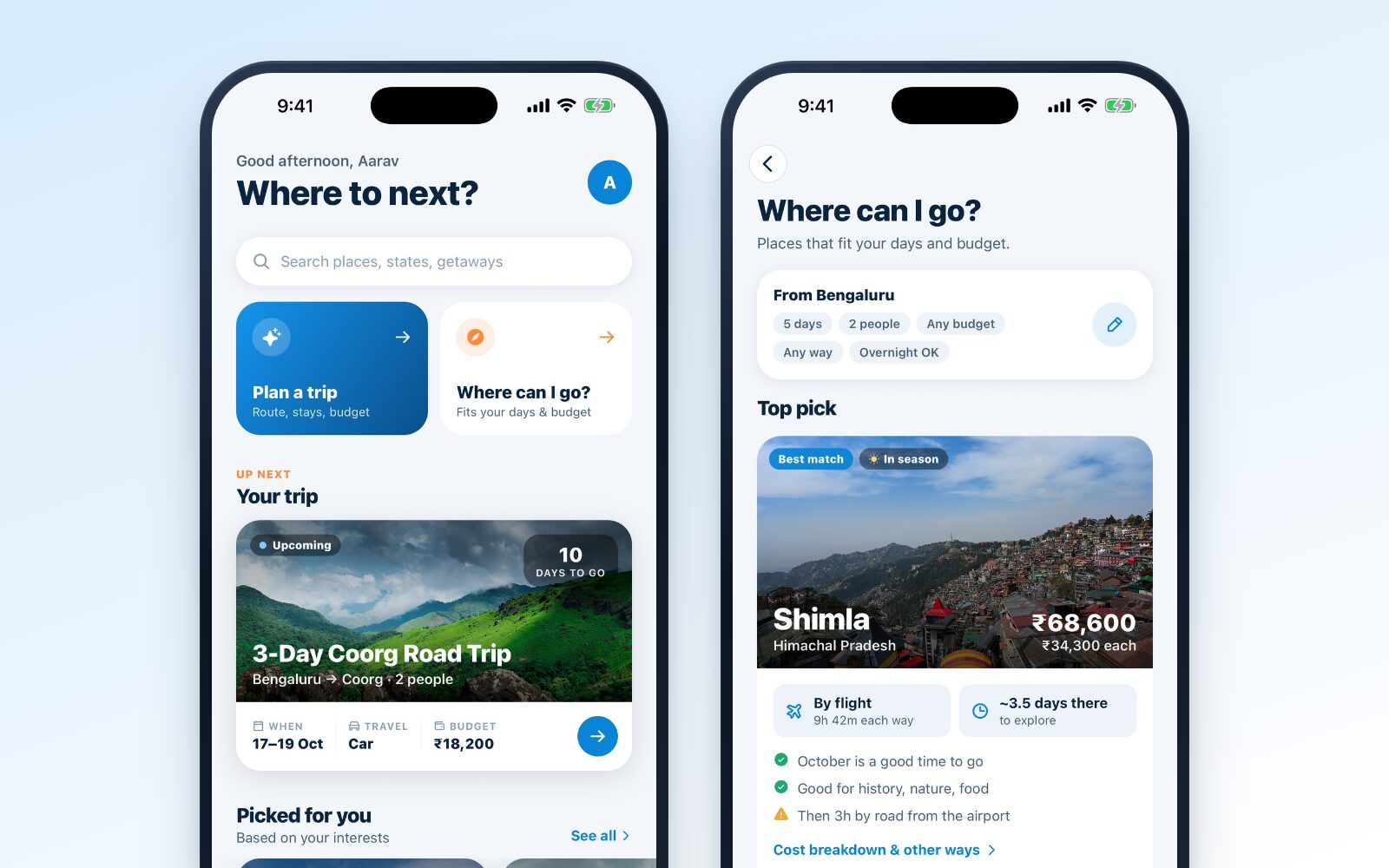
The question most trips actually start with. Give JrnyLoop your starting city, how many days you have (1 to 14), your budget for the group, who's going and how you're happy to travel, and it shows the places that fit.
Every suggestion comes with the numbers that matter: the total cost and the cost per person, how you'd get there and how long it takes, how many days you'd really have once there, and plain reasons for and against. A place might be "a good time to go" in October, "good for history, nature, food", or come with a warning that the airport is three hours away by road. Sort by best match, cheapest or most time there, and plan any of them in one tap.
Destination guides
JrnyLoop's destination guides are checked by hand. Each one has an overview, the best time to visit, sights you can filter by interest, where to stay, what to eat and local tips.
Tap a sight for its details: a photo, how long to spend there, the entry fee, the best time of day, the season, why it's worth going, a short history and practical tips. From there you can save it, get directions, or plan a trip around it.
For places without a guide, JrnyLoop still plans the trip. It finds sights nearby from Wikipedia and OpenStreetMap.
Ready-made trips
Prefer to start from something proven? Ready-made trips preview the days, the stays, the food, the journey and the cost by category. Use this trip copies it into your trips, ready to change.
Saved places and the map
Save sights as you browse and sort them into collections: a "Someday" list, a "Monsoon in the Western Ghats" list, whatever helps. The Map tab shows destinations to explore, your trips and your saved places, all on one map of India.
Features for planning the trip
An AI trip planner with a reliable core
Here's what happens when you tap Plan my trip. A rule-based planner does the heavy lifting, so the plan holds together even when the AI isn't available:
- It works out the route. Road distances and times come from route planning, then get stretched for how Indian roads really drive. Any stretch longer than a comfortable day is split at a named overnight halt. Bikes get shorter days, families and relaxed trips shorter still. Trains and flights use their own speeds.
- It lays out the days. Travel days get breakfast, chai, fuel and lunch breaks, plus scenic sights near the road. Explore days group nearby sights and order them by when they're best: sunrise points at sunrise, sunsets at sunset. It also handles acclimatisation days for high-altitude places, day trips, and sights that are closed in your season.
- AI polishes the sightseeing days. It regroups and describes them, choosing only from sights JrnyLoop already knows are there. Anything new it suggests is kept only if it's really nearby. Travel days are never touched, and if the AI is slow or down, the plan simply goes ahead without it.
- It prices and packs. It picks the most comfortable stays your budget allows, prices everything for your group and writes a packing list.
Every sight in your plan says where its details came from (JrnyLoop's guide, Wikipedia, OpenStreetMap or the AI) and how fresh they are, so you know what to double-check.
Stops on the way
Add up to three stops between your start and your destination. The route goes through them in order, and long stretches between them still get split at overnight halts. It's how a Delhi to Manali drive can become a trip with a night in Chandigarh or Mandi along the way, rather than one very long day.
Budget estimates you can trust
Every trip gets a budget for your whole group, split into travel and fuel, stays, food, activities and miscellaneous, with a figure per person. Choose a stay style and the whole trip re-prices:
| Stay style | What it means |
|---|---|
| Budget | Hostels, homestays and simple hotels |
| Comfort | Good 3-star hotels and cottages |
| Premium | Resorts and boutique stays |
Once you're travelling, log what you spend by category (fuel, transport, stay, food, activities, shopping and miscellaneous) and see each one against the plan, so "we're over budget" is something you notice on day two, not after the trip.
Packing lists that know where you're going
The packing list is written for the terrain, the season, how you're travelling and who's coming. A mountain trip adds a warm jacket, thermals and gloves. A beach trip adds swimwear and a waterproof phone pouch. A road trip adds your licence, RC, insurance, PUC and FASTag balance. Add your own items, and watch the progress bar fill as you tick them off.
Stay and eat
Each trip has a Stay & eat tab with the trip's highlights, the best areas to stay and the food the place is known for. Each opens to real places nearby, so you can go from "stay near the Mall Road" to an actual hotel without leaving the plan.
Entry permits
Some places in India need an entry permit even for Indian visitors: an Inner Line Permit for Arunachal Pradesh, Nagaland or Mizoram, for example, or for Nubra Valley and Pangong in Ladakh. When your destination or a stop on the way needs one, JrnyLoop says so on the trip and on the destination page, and adds the paperwork to your packing list.
Features for getting ready
Getting there: trains, buses, cars, bikes and flights
Getting there compares the ways to reach your destination side by side, with a journey time for each: bike, car, bus and train.
- Train: the trains between the nearest sensible stations, going and returning, from Indian Railways' Trains at a Glance, marked when they're the fastest or run overnight. Tap a train to use it for the first day, and the day takes its real departure and arrival times. Pick one for the way back too.
- Bus: on popular routes, where to board, who runs the buses, roughly when they leave and how often.
- Car and bike: the distance and the time on the road, plus breaks. Switch the first day or the way back to driving in one tap.
- Flight: which airport makes sense, how far it is from home and from where you're going, and the option to fly that leg instead.
JrnyLoop doesn't sell tickets. It helps you choose, and you book with the operator as usual. Timetables change, so check before you travel.
Bookings and tickets wallet
Keep every booking with the trip it belongs to: train PNRs, flight booking codes, bus tickets, hotel booking IDs, activities, and anything else, like a permit. Add a date and time, a note ("Coach B2, seats 33 and 36"), and a photo or screenshot of the ticket. Bookings are listed by day, and a reference copies with one tap.
In the app, the list and the ticket photos stay on your phone once you've opened them, so they open at the station even with no signal. Each booking is private to you unless you share it with the trip.
Add to calendar
From any trip's menu, Add to calendar puts one all-day event on each day of the trip, with that day's stops in the notes. It's available to everyone on the trip once it has dates.
Reminders
The app can remind you the day before a trip starts, and the reminder names your train if you've picked one. There's also a nudge the day before your train back. Notifications only go out between 9 am and 9 pm, and they never show amounts or notes on your lock screen. Turn reminders and group updates on or off in Settings.
Features for the road
The Today card
While a trip is on, the app's home screen swaps your "next trip" card for Today: the day's weather, the stop to head to next with one-tap directions in Apple Maps or Google Maps, what's later in the day and, on your own trip, a Done button. The full plan is a tap away, and people who joined your trip see the same card without the controls.
Running late?
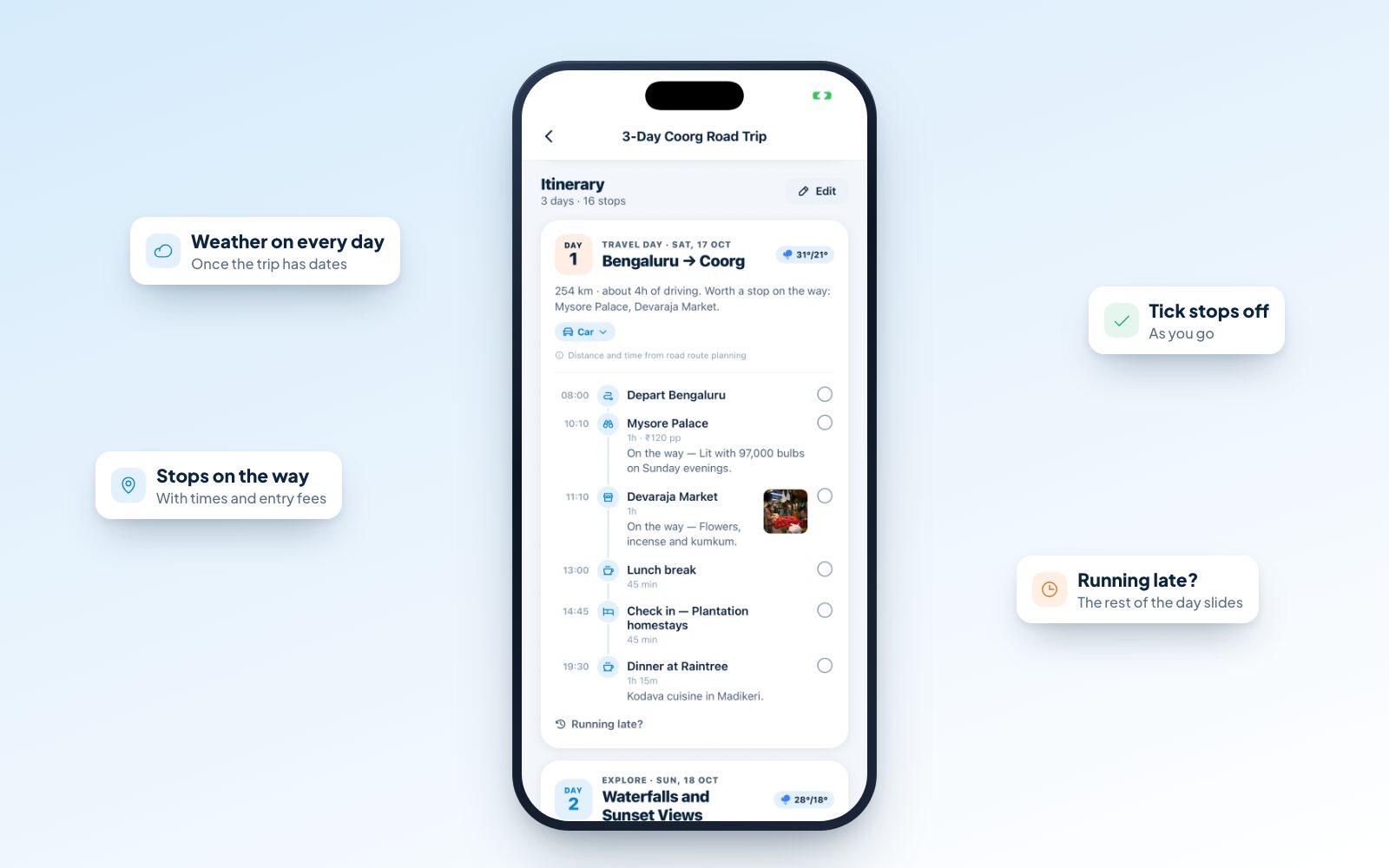
Every trip runs late eventually. On a trip you planned, tap Running late? on a day (or on the Today card) and choose +30 minutes, +1 hour or +2 hours. Everything not done yet slides later. Stops you've pinned as fixed, like a booked train or a dinner reservation, stay put, and JrnyLoop tells you if something no longer fits.
Weather-aware days
Give a trip dates and each day shows its forecast. When rain looks likely on a day full of outdoor plans, JrnyLoop suggests swapping it with a drier day, like "Swap Day 2 ↔ Day 3", and does it in one tap. For high places, it also warns you about near-freezing nights so you pack properly warm.
Change one leg, not the whole trip
Decided to take the train back instead of driving? Change the travel mode on just that day, and it's re-timed and re-priced. Edit mode lets you remove stops (the stops after them get the time back) or add your own.
Essentials near your stay
In Stay & eat, JrnyLoop lists the essentials near each night's stay: the nearest hospital or clinic, pharmacy and ATM, plus a fuel pump on road trips, each a tap away from directions. Where a small town has none mapped nearby, it says so ahead of time ("carry cash from…"), so the ATM hunt doesn't start at 10 pm. The data comes from OpenStreetMap, and small towns can be missing places, so treat it as a head start rather than gospel.
Works without signal
In the app, trips you've opened stay on your phone, and JrnyLoop keeps your next few upcoming trips ready in the background. A small cloud mark on a trip card means the whole plan is saved. When the network drops, a "You're offline" banner tells you saved trips still open, and the plan, the Today card and your ticket photos keep working.
Tick it off
Tick stops off as you go, and pack with the checklist. It's small, but it turns a plan into a record of what you actually did.
Features for travelling together
Group trips get their own set of features. We cover them in depth in how to plan a group trip with friends, but in short:
- Invite links. Send one link to the group chat. Anyone who opens it and signs in joins the trip and sees the plan.
- Group polls. Settle the dates, the place or anything else with a vote. When a dates poll is decided, the trip's owner can make it the trip's dates in one tap.
- Shared expenses. Anyone can add what they paid and who it was for, split equally or by exact amounts. JrnyLoop works out who owes whom, and Settle up shows the fewest payments that square everyone.
- Shared bookings. Share a ticket with the trip so everyone can see the PNR.
- One owner, one plan. Everyone sees the same itinerary; the person who planned it makes the changes, so it never turns into a free-for-all.
Sharing a trip
Not everyone needs to join a trip to see it. Share trip link creates a link anyone can open on the web, with no app or account needed. It shows the itinerary, the map, the budget estimate, and where to stay and eat. You choose whether it shows where you start and your dates. It never shows your notes, bookings, expenses, packing list, what you've ticked off, or who you are.
Friends who like your plan can copy it into their own JrnyLoop: exactly as it is, or planned afresh from their own city. Turn the link off any time and it stops working for everyone. You can also share a trip as plain text, handy for a quick message.
After the trip
When you're back, mark the trip completed from its menu. JrnyLoop deliberately never does this for you, since the dates may have moved or the trip may not have happened. If you forget, it nudges you the day after the trip ends. Completed trips feed your profile's travel story: how far you've gone and how many trips you've taken.
Privacy and control
- Private by default. Only you can see a trip until you share it or invite someone.
- No passwords. Sign in with a 6-digit code sent to your email, or with Google, or with Apple on an iPhone.
- Real, credited photos. Destination photos come from Wikimedia Commons, with every photographer named.
- Leave any time. Delete your account from Settings and everything in it is erased straight away: your profile, trips, expenses, saved places and shared links.
Web and app
You can use JrnyLoop in your browser at jrnyloop.com or in the app, with the same account and the same trips. Plan on a big screen at home, then tick things off on your phone on the way. The app adds the things that matter on the road: trips that work offline, your home city from GPS, photos from your camera, the Today card and reminders.
Try it on your next trip
The best way to see what an AI trip planner can do is to plan a trip you're actually thinking about. Tell JrnyLoop where you're starting and where you'd like to go, or ask Where can I go?, and see the whole trip take shape in seconds.
Start planning on JrnyLoop, or browse destination guides for ideas.


Comments